
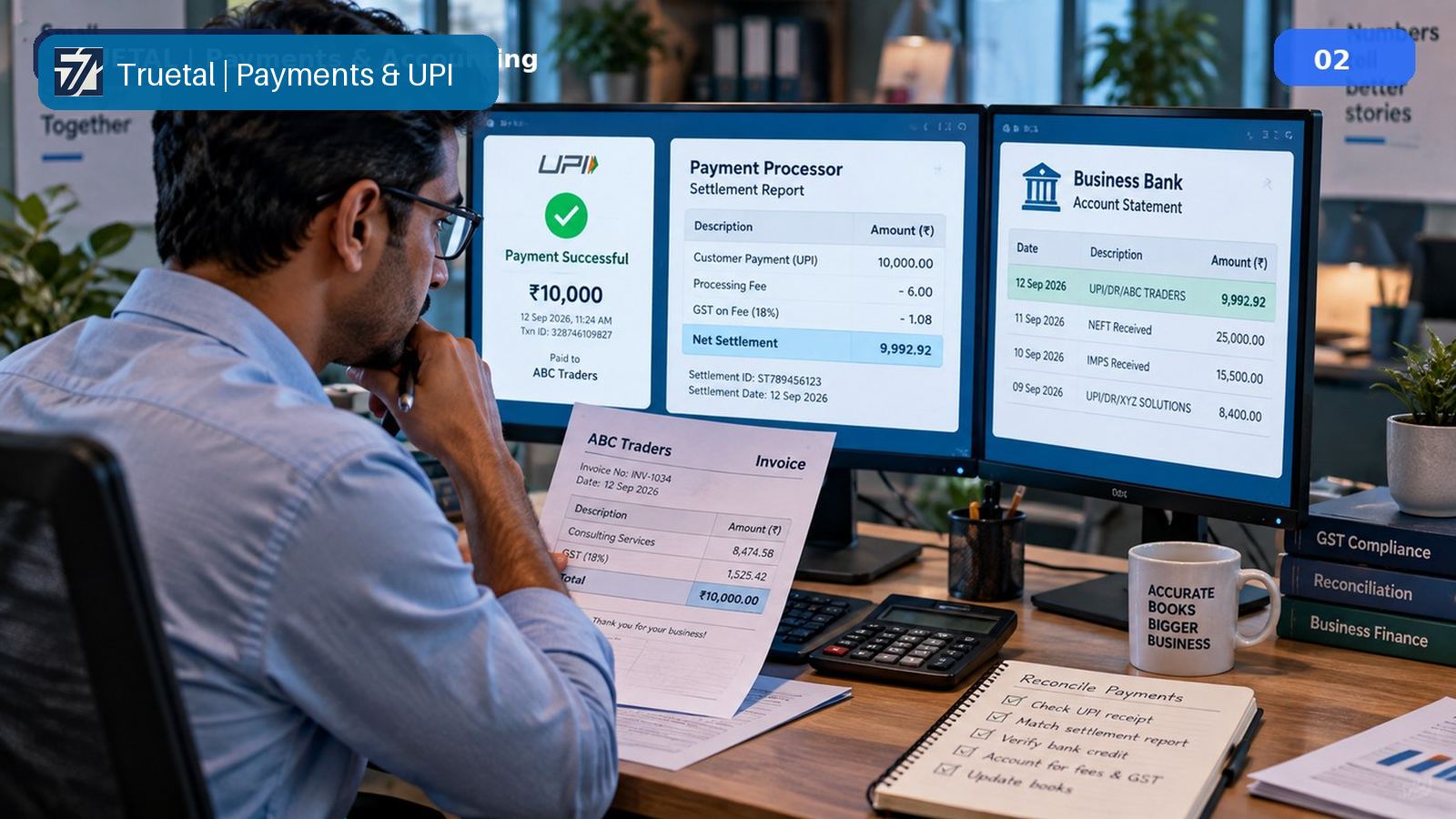
Your invoice says ₹10,000, the customer paid ₹10,000, but the bank shows a slightly smaller credit. That does not automatically mean your sale should be reduced. The missing amount is usually sitting in fees, tax on fees, refunds or another settlement adjustment.
The Short Answer
Keep gross revenue tied to the customer invoice. Book payment-provider charges separately, record any eligible input GST from the provider invoice, and clear the customer receivable for the gross amount when the processor settles on the customer’s behalf.
In Plain Words
Keep the gross invoice and customer receivable intact. Use the settlement report to split the bank receipt from the processor fee and GST on that fee. This is the same logic used for card gateways and marketplace settlements: gross sale in one place, deductions in their own ledgers.
Why the bank credit can be lower than the invoice value
Once your payment aggregator or bank charges MDR (or any other processing fee) on a UPI settlement, the amount that lands in your account is the sale value minus that fee and any GST charged on the fee. This is completely normal — the same pattern already exists for card payments, payment gateways and marketplace payouts. The mistake is treating the shortfall as a mystery to be explained away, instead of a fee to be booked.
Gross sale vs net settlement — do not net revenue casually
Your sales invoice and your GST return should always show the full, gross taxable value the customer was billed — never the net-of-fee amount. If you reduce reported revenue to match a smaller bank credit, you understate turnover, distort your GST liability, and break the audit trail between invoice and payment. The processor's fee is a cost of accepting payment, not a reduction in what you sold.
The journal entry pattern
Use a settlement clearing account to hold the gap between "what the customer owes" and "what the bank actually received," so both sides of the transaction stay independently correct:
- On invoice: Dr Accounts Receivable / Cr Sales + GST Payable — for the full ₹10,000 invoice value, as always.
- On settlement: Dr Bank (net amount received) + Dr Processor Fee Expense (the MDR) + Dr GST Input Credit (GST on the fee, if eligible) / Cr Accounts Receivable (full ₹10,000) — this single entry clears the receivable completely while correctly splitting where the money actually went.
The receivable is closed in full. Nothing about the customer's invoice changes.
GST on the processor fee — and the ITC documentation you need
The MDR itself typically carries GST, charged by the payment aggregator or bank on their service. Whether you can claim that as Input Tax Credit depends on the normal GST eligibility rules for your business — it is not automatic. What you must have on file regardless: the processor's own tax invoice for the fee period, showing their GSTIN, the fee amount, and the GST charged. A bank statement line alone is not valid supporting documentation for an ITC claim — you need the actual invoice from the aggregator.
How to reconcile thousands of UPI settlements automatically
At volume, manually journaling every transaction is impractical. A reconciliation engine should:
- Match each bank credit to the invoice(s) it settles, using UPI reference numbers, payer VPA, amount and date as matching keys — in that order of reliability.
- Automatically split a net credit into its gross-invoice, fee and GST-on-fee components using the processor's own settlement report (most aggregators provide a downloadable settlement CSV alongside the bank credit).
- Flag anything that doesn't match cleanly for a human to review, rather than forcing a guess.
Exceptions that break simple matching
A few scenarios need special handling and should never be auto-matched blindly:
- Refunds and chargebacks — these reduce a prior settlement, not the current one; matching them to today's invoices will create false reconciliation.
- Failed settlements that later retry — can create a duplicate-looking credit if your matching key isn't strict enough.
- Batched settlements — one bank credit covering many small transactions from the same day needs to be split against multiple invoices, not matched 1:1.
Worked example: one ₹10,000 UPI sale, start to finish
Scenario: You invoice a customer ₹10,000 (say ₹8,474.58 taxable value + ₹1,525.42 GST at 18%). The customer pays by UPI. The processor deducts a ₹6.00 MDR and ₹1.08 GST on that fee, and credits your bank ₹9,992.92.
- On invoice: Dr Accounts Receivable ₹10,000 / Cr Sales ₹8,474.58 and Cr GST Payable ₹1,525.42.
- On settlement: Dr Bank ₹9,992.92, Dr Payment Processing Fees ₹6.00, Dr GST Input Credit ₹1.08 (only if eligible and backed by the processor's tax invoice) / Cr Accounts Receivable ₹10,000.
- Check: debits ₹9,992.92 + ₹6.00 + ₹1.08 = ₹10,000.00, equal to the credit. The receivable is now zero.
Result: Sales stay at the full invoice value, the customer's receivable is fully cleared, and the ₹7.08 gap sits in two clearly named ledgers instead of a mystery difference.
Key takeaway: The bank credit was never the sale value. Make the settlement bridge explain the gap — do not shrink the sale to match the bank.
Illustrative example. Actual treatment may depend on the facts and rules applicable on the transaction date.
The Key Steps at a Glance
Read the four steps in order — each one depends on the one before it.
- 1Why bank credit can be lower than invoice value
- 2Gross sale vs net settlement – do not net revenue casually
- 3Journal entry pattern with settlement clearing account
- 4GST on processor fee and ITC documentation
What to do now
- Confirm your accounting software books the processor's fee and GST-on-fee as separate line items, not netted against revenue.
- Request (or confirm you're already receiving) a settlement report from your payment aggregator that itemises fee and tax per transaction.
- Check that your ITC claims on processor fees are backed by the aggregator's actual tax invoice, not just the bank statement.
To prove net settlements against your books at month-end, prepare a bank reconciliation statement for the settlement account.
Common mistakes
- Editing the original sales invoice to match the smaller bank credit.
- Claiming ITC on the processor fee using only the bank statement as evidence.
- Treating every bank-credit shortfall as an error to chase, instead of checking the settlement report first.
The Takeaway
Do not make revenue match the bank by shrinking the sale. Make the settlement bridge explain the difference instead.
How Truetal Helps
Truetal's bank reconciliation suggests matches for UPI settlement lines and waits for your confirmation. Any difference between the invoice value and the bank credit, such as a processor fee, is recorded only after you review it.
Questions People Search For
- UPI settlement reconciliation accounting
- Payment gateway fees accounting entry
- UPI bank reconciliation
PIB press releases on the September 2026 UPI MDR framework; CBIC accounts and records rules. Confirm your specific processor's fee schedule and settlement-report format with your own payment aggregator.