
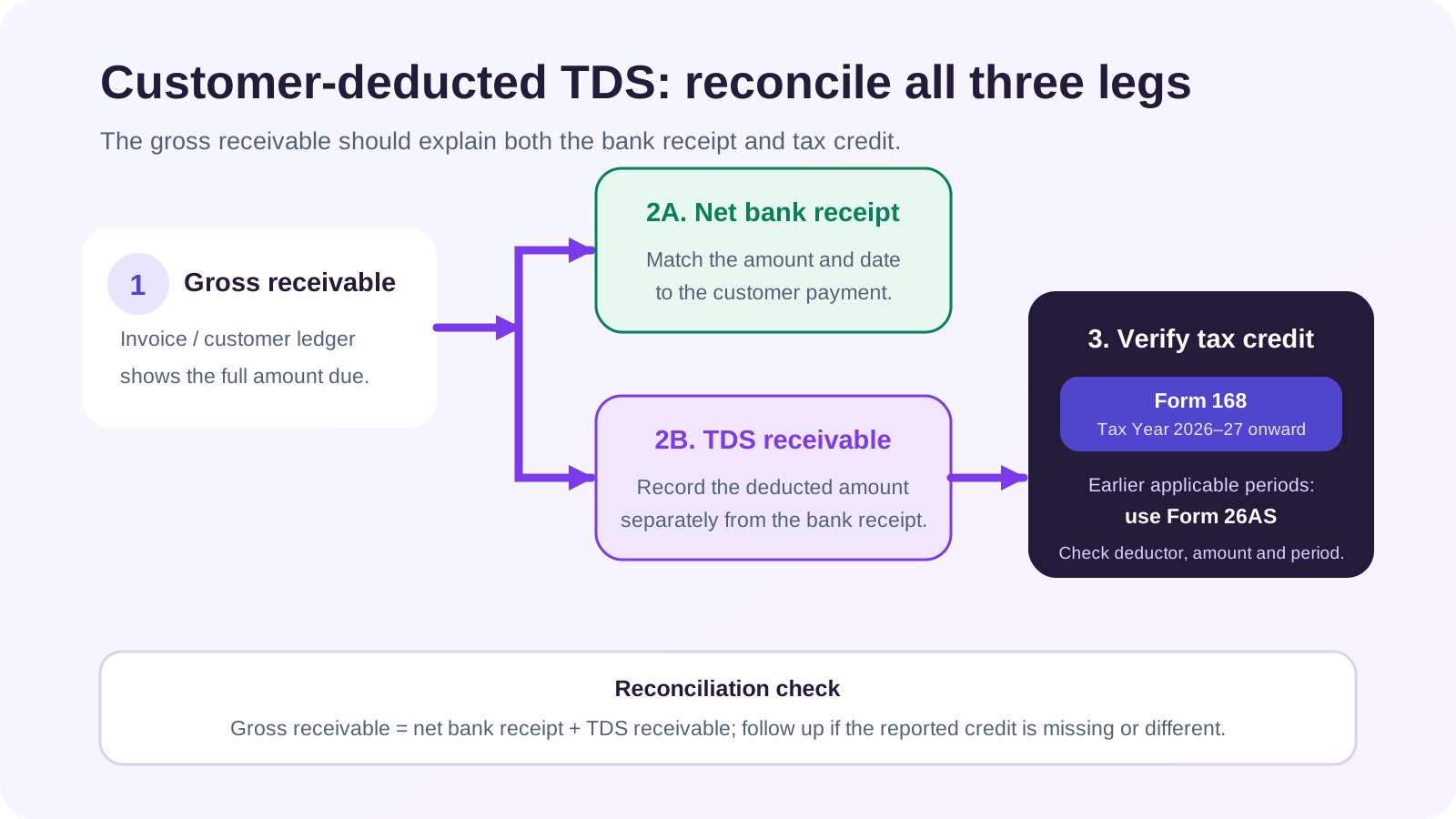
When a customer pays an invoice after deducting TDS, do not reduce revenue and do not leave the invoice partly unpaid. Debit the bank for cash received, debit TDS Receivable for tax deducted on your behalf, and credit the customer for the full amount settled. Then reconcile the deduction with the applicable annual tax statement and TDS certificate before claiming credit.
The direct answer
Treat customer-deducted TDS as an asset until it is available and used as tax credit—not as a sales discount or business expense. The customer’s net bank payment and TDS credit together settle the gross receivable.
Use the statement for the correct year. For FY 2025-26 / AY 2026-27, reconcile the old-year AIS/Form 26AS framework. For income and deductions in Tax Year 2026-27 under the new Act, reconcile Form 168 and the related information made available on the e-filing portal.
Income-tax transition caution, reviewed 15 October 2026: use the earlier of credit or payment. If that earlier event occurred on or before 31 March 2026, the Income-tax Act, 1961 and legacy references apply; if it occurs on or after 1 April 2026, the Income-tax Act, 2025 applies. Most non-salary TDS provisions are consolidated in section 393. Form 168 is the annual information statement for Tax Year 2026-27, and Form 131 replaces legacy Form 16A for covered non-salary certificates under the new framework.
The accounting entry
Assume the customer ledger shows ₹1,00,000 outstanding. The customer remits ₹90,000 and confirms ₹10,000 was deducted as TDS. These numbers are illustrative only; the correct section, rate and deduction base depend on the payer, payee, payment type, date and current law.
| Account | Debit | Credit |
| Bank | ₹90,000 | — |
| TDS Receivable | ₹10,000 | — |
| Customer | — | ₹1,00,000 |
| Total | ₹1,00,000 | ₹1,00,000 |
The original invoice entry remains unchanged. If it included GST, revenue and output GST stay in their correct accounts. TDS does not reduce the taxable sale simply because the bank received less cash.
Form 168, earlier Form 26AS and the transition
The Income Tax Department’s TDS transition FAQ separates obligations by the earlier of credit or payment. Up to 31 March 2026, the old Act and old section references apply. From 1 April 2026, the new Act and its numbering apply; the Department warns that quoting an old section for a post-transition payment can lead to processing errors and require a correction statement.
For the deductee, the same separation matters when checking credit:
- deductions relating to FY 2025-26 and AY 2026-27 remain in the old-year reporting stream;
- the annual information statement for Tax Year 2026-27 is Form 168; and
- the portal is expected to keep the periods separately accessible.
Do not reconcile only by customer total. Match the year, deductor identity, TAN/PAN information, amount paid or credited, tax deducted, deposit status and applicable section/table reference.
Reconciliation checklist
- Start with the invoice and full customer-ledger outstanding.
- Obtain the remittance advice explaining the net payment.
- Confirm the customer actually deducted TDS rather than taking an unauthorised discount.
- Verify the deduction date and the earlier-of-credit-or-payment event for the old/new Act transition.
- Confirm the applicable section/table, rate and base with current guidance or your tax adviser.
- Post the difference to TDS Receivable only after review; do not change the bank amount.
- Obtain Form 131 for the applicable new-law non-salary deduction, or the legacy Form 16A/applicable certificate for an earlier period.
- Match deductor, year, amount and credit in Form 168 or the applicable earlier statement.
- Maintain an exception list for deductions not appearing, appearing in the wrong year or carrying incorrect details.
- Clear TDS Receivable through the supported income-tax credit/refund accounting process. If the asset later becomes unsupported, use only a separately reviewed and approved accounting adjustment or write-off, with the tax treatment considered independently.
What to do when the credit is missing
First check whether you selected the correct assessment/tax year and whether the customer reported your PAN correctly. Compare the certificate, remittance advice and statement at transaction level.
If the deductor’s filing is wrong or missing, inform the deductor promptly. Official mismatch guidance tells the deductee to contact the responsible deductor, who may need to correct or revise the TDS statement. You cannot create the government credit merely by posting TDS Receivable in your books.
Keep the item open with the responsible customer, amount, certificate status and follow-up date. Escalate before the return is finalised rather than discovering at filing time that the book asset has no matching portal credit.
Common mistakes and edge cases
Recording only the net bank receipt as revenue. This understates turnover and leaves the invoice trail wrong.
Posting TDS as an expense. Customer-deducted TDS is ordinarily tax paid to your credit and recorded as a receivable/advance-tax asset, subject to confirmation.
Clearing the invoice only for cash received. The remaining amount then appears overdue even though the customer says it was deducted as tax.
Assuming every short receipt is TDS. It may be a discount, bank fee, withholding dispute, chargeback or partial payment. Require evidence.
Using old section references after 1 April 2026. The transition FAQ warns this can create return-processing errors even where rates and thresholds did not change.
Checking the wrong year’s statement. March and April 2026 items can fall into different statutory reporting streams.
Claiming more credit than the portal shows without resolving the mismatch. Reconcile and follow the current rectification/correction process with professional review.
How Truetal helps
Truetal’s bank-reconciliation workflow can preserve the actual net bank line while a reviewed settlement adjustment posts the explained difference to TDS Receivable and clears the customer document. It does not import or verify Form 168/26AS, determine the legal TDS section or rate, or create a government tax credit. The user and tax adviser must verify those items on the official portal.
FAQ
Is customer-deducted TDS an expense?
Normally no. It is tax deducted on your behalf and is generally recorded as TDS Receivable until matched and used as credit or refund, subject to the transaction and tax records.
Why is my invoice still outstanding after the customer paid net of TDS?
If only the bank amount was posted, the deduction was never applied to the customer ledger. Record a reviewed TDS Receivable adjustment so cash plus TDS equals the amount settled.
Is Form 168 the same as Form 26AS?
Form 168 is the annual information statement named for Tax Year 2026-27 under the new framework. Earlier-year credit remains in the applicable old-year AIS/Form 26AS stream, so select the correct period.
What if deducted TDS does not appear in the statement?
Check the year, PAN, deductor details, certificate and amount, then contact the deductor. Official mismatch guidance says the deductor may need to file a revised TDS return; a book entry alone cannot create the credit.
The takeaway
Keep three truths aligned: the full customer invoice, the net bank receipt and the government tax-credit statement. TDS Receivable is the bridge, not a plug or an expense.
Sources
- Income Tax Department — TDS Compliance FAQs for the 1 April 2026 transition
- Income Tax Department — Form 168 (Earlier Form 26AS): View Annual Tax Statement
- Income Tax Department — Form 131 (Earlier Form 16A) FAQs
- Income Tax Department — Tax Credit Mismatch guidance
- Income Tax Department — Section 393 of the Income-tax Act, 2025