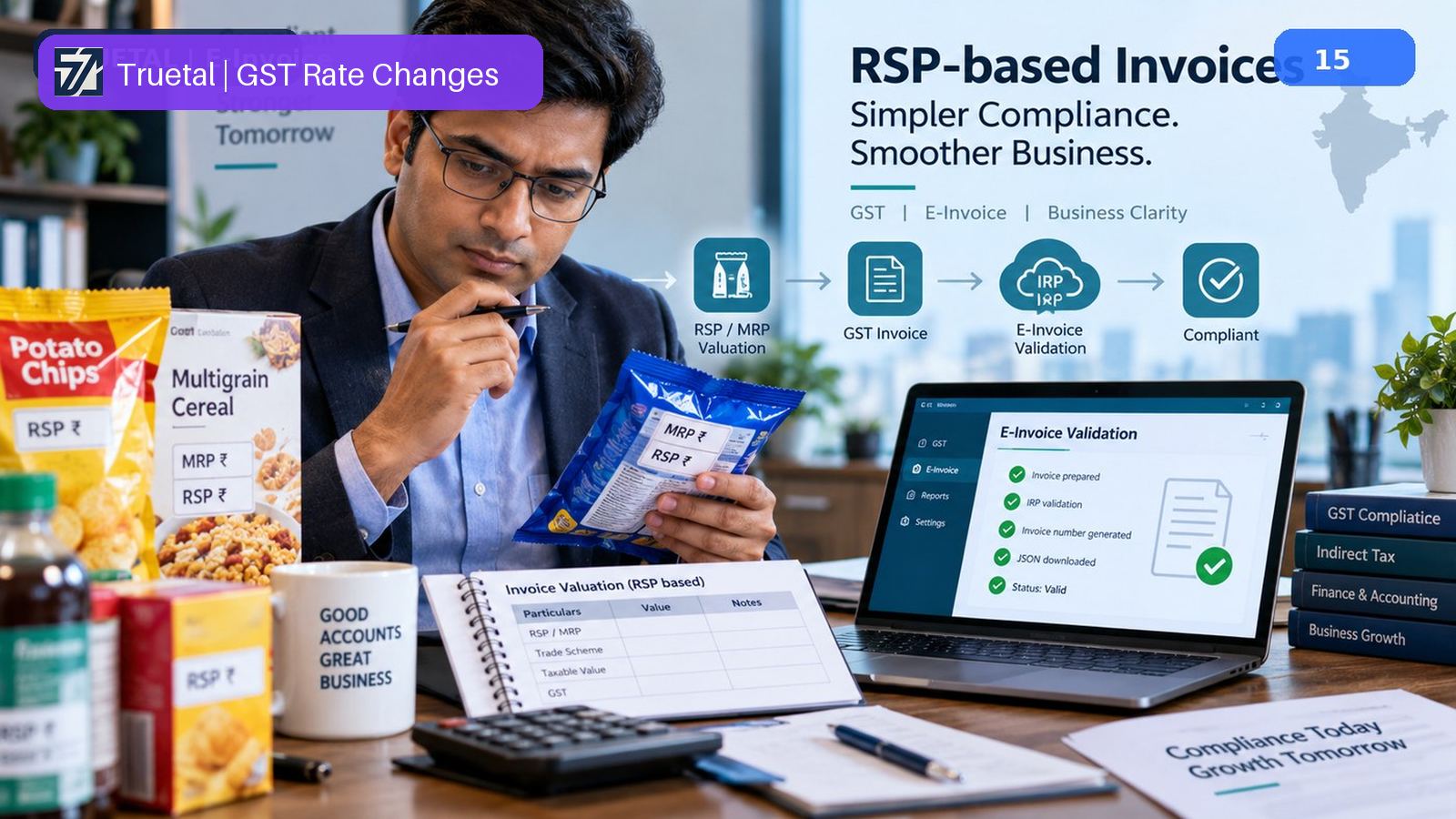
Some notified retail-sale-price valuation cases do not behave like a normal taxable-value × rate calculation. When ERP teams assume every invoice line must follow the same arithmetic, they may try to 'fix' a valid RSP-based document that the current IRP rules actually permit.
The Short Answer
Do not “fix” a valid Retail Sale Price (RSP)-based invoice merely to satisfy an old arithmetic assumption. Detect notified Retail Sale Price (RSP) scenarios, apply the current rule set and log the valuation basis so the accounting and tax teams can explain the difference.
In Plain Words
The ERP needs a clear flag for items/scenarios where RSP-based valuation rules apply. That flag tells the validation engine not to apply an ordinary line-total assumption blindly, and it gives the tax team a reason code explaining why the arithmetic looks different.
What RSP-based tax calculation changes conceptually
For certain notified categories, GST valuation is based on the product's Retail Sale Price / MRP rather than a straightforward transaction-value calculation — meaning the relationship between quantity, unit price and total item value doesn't follow the standard multiplication-and-tax formula most invoicing systems assume by default.
The 2026 IRP validation relaxation
The e-Invoice IRP's own release notes describe a relaxation, effective from February 2026, to certain validations (including checks that previously flagged item totals like TotItemVal as inconsistent) specifically to accommodate notified RSP-based calculations that don't follow the standard formula.
Errors / validations affected
If your system was previously working around a rigid TotItemVal check by forcing round-number adjustments on RSP-based line items, that workaround may no longer be necessary — and may now actively cause a mismatch against the genuinely correct, relaxed validation behaviour.
ERP flag: identify RSP-notified items
Tag which of your products fall under a notified RSP-based valuation scheme, so your invoicing logic can apply the correct, non-standard calculation for exactly those items while keeping standard transaction-value logic for everything else.
Testing line-value and tax totals
After identifying RSP-flagged items, test real invoices containing them against the current IRP validation rules directly — don't assume last year's validation behaviour still applies, given the February 2026 relaxation.
Audit evidence to store with the invoice
For every RSP-based invoice, retain a note of which valuation basis was applied and why — this is what will make the invoice's line-item arithmetic explainable to anyone reviewing it later without the RSP context in front of them.
Worked example: handling a notified RSP-based item in your ERP
Scenario: Your item master contains a product that falls under a notified retail-sale-price (RSP) valuation scheme. Your validation code rejects its invoice line because the item total does not equal quantity × unit price plus tax.
- Flag the item. Mark the SKU as RSP-notified in the item master, with the valuation basis and the notification it relies on.
- Branch the calculation. Apply the RSP-based valuation for flagged items only; keep the standard transaction-value logic for everything else.
- Test on real documents. Generate a sample e-invoice containing the flagged item and check the response against the current IRP validation rules, not last year's behaviour.
- Remove old workarounds. If earlier code forced round-number adjustments to satisfy the old check, take them out — they can now cause a mismatch of their own.
- Store the evidence. Save the valuation basis with the invoice so anyone reviewing the arithmetic later can see why the line does not follow the usual formula.
Result: Valid RSP-based invoices are accepted as they are, and the arithmetic difference is explained on the record.
Key takeaway: Do not "fix" a valid RSP-based invoice to satisfy an old assumption — detect it, apply the current rule, and log the basis.
Illustrative example. Actual treatment may depend on the facts and rules applicable on the transaction date.
The Key Steps at a Glance
Read the four steps in order — each one depends on the one before it.
- 1What RSP-based tax calculation changes conceptually
- 2The 2026 IRP validation relaxation
- 3Errors / validations affected
- 4ERP flag: identify RSP-notified items
What to do now
- Identify which of your products, if any, fall under a notified RSP-based valuation scheme.
- Remove any manual "rounding workaround" your system applied to force old-style TotItemVal validation to pass for these items.
- Test against the current IRP validation behaviour directly before assuming either the old or new rule set applies.
Common mistakes
- Manually adjusting a genuinely correct RSP-based total to satisfy an outdated internal validation assumption.
- Not flagging which products are RSP-based, making the unusual arithmetic look like a data error to anyone reviewing it later.
- Assuming the relaxation applies to all products rather than only notified RSP-based valuation scenarios.
The Takeaway
RSP-based validation needs scenario-aware software, not a blanket arithmetic rule. Store the valuation reason so finance can explain the number.
How Truetal Helps
Truetal can retain item, HSN and valuation details in the invoice trail; the user must verify whether the notified RSP treatment applies.
Questions People Search For
- RSP based GST e invoice validation 2026
- TotItemVal validation RSP invoice
- E invoice error 2194 2234 2235
Sources
e-Invoice IRP FAQ and release notes. Confirm whether your specific products fall under a notified RSP-based valuation scheme before applying this treatment.