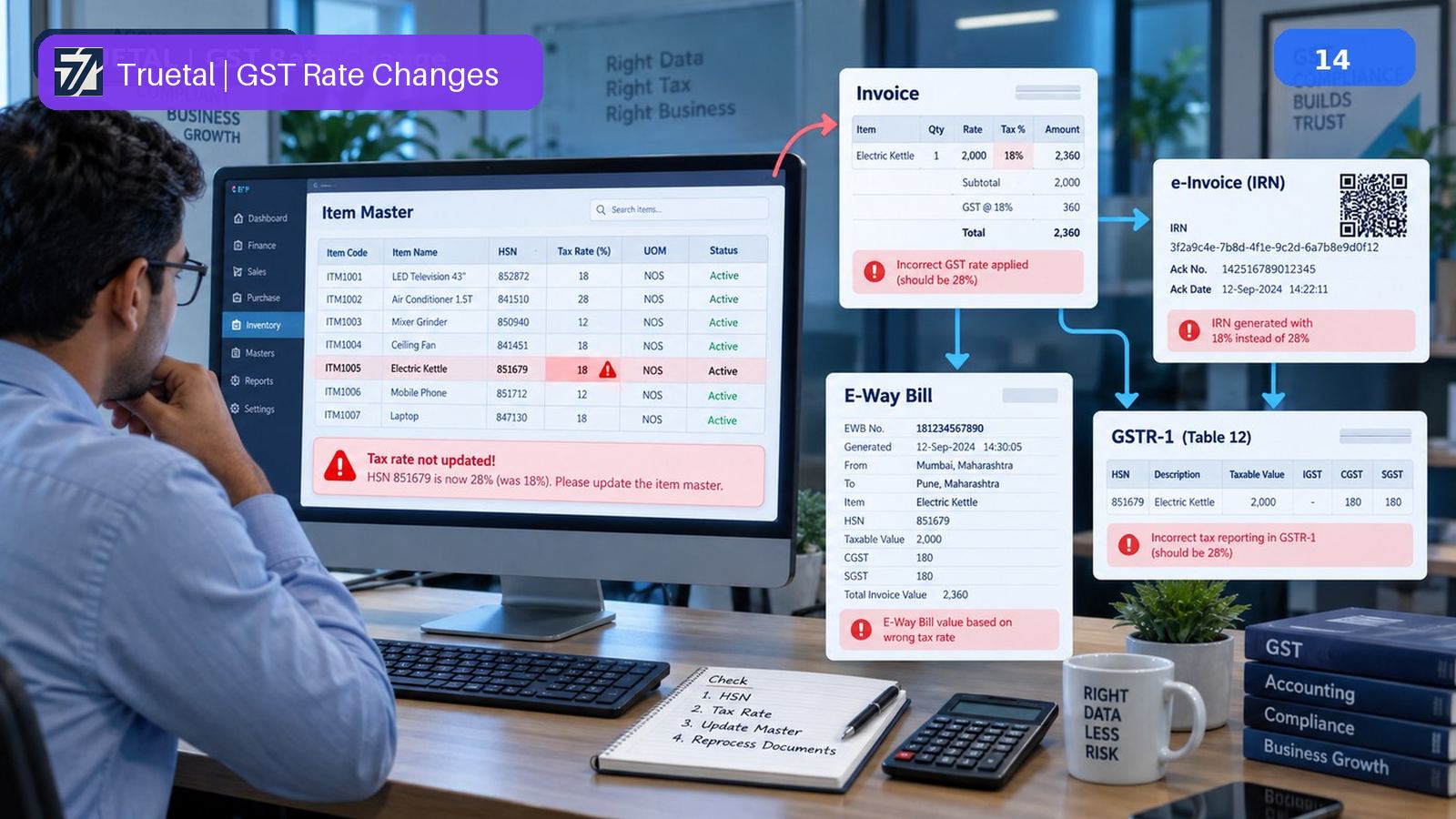
A tax-rate change can be correct in the law and still fail in your business because the item master was never updated. One wrong HSN/rate row can then flow into quotations, invoices, IRN, e-way bills and returns month after month.
The Short Answer
Treat a rate change as controlled master-data migration: effective date, HSN mapping, open quotations / POs, recurring invoices, stock pricing, e-invoice validation and return mapping all need coordinated testing.
In Plain Words
Treat a GST-rate change as a controlled master-data release. Update the HSN/rate table with an effective date, identify open quotations/POs/recurring invoices that cross that date, and test invoice, IRN, EWB and return outputs before production.
Why master data causes repeated tax errors
The practical failure mode after a rate change is almost never "we don't understand the new rate" — it's "our item master still has the old rate mapped to this HSN, and nobody checked."
Create an HSN-rate effective-date table
Rather than a single "current rate" field per HSN, maintain a proper effective-date history: which rate applied from which date to which date. This lets your system correctly rate a backdated transaction and correctly apply the new rate going forward, without manual intervention at the moment of change.
Identify open transactions crossing the change date
Before a rate change takes effect, run a report of every open quotation, draft invoice, and recurring invoice template that could be issued on or after the effective date with the old rate still attached — these need explicit review, not a silent auto-carry-forward.
Test invoice, credit note, EWB and IRN flows
After updating the master data, don't just check that a new invoice shows the right rate — test the full chain: does the e-invoice submission accept the new rate, does the e-way bill's tax breakdown match, does a credit note against an old-rate invoice still correctly use the old rate?
Exception report for overridden tax rates
If your system allows a rate to be manually overridden at the line-item level (common for genuine exceptions), run a periodic report of every overridden rate — these are exactly where a stale manual override can persist long after the master data itself has been corrected.
Change-management and audit log
Log who updated the HSN-rate mapping, when, and to what value — a rate-change error discovered weeks later is much easier to trace and fix if there's a clear record of exactly when the master data changed.
Worked example
One HSN code feeds five downstream outputs: a quotation generated from the item master, an invoice raised against that quotation, the e-invoice/IRN submission derived from the invoice, the e-way bill's tax breakdown, and the GSTR-1 entry for that supply. Update the HSN mapping once, correctly, and all five inherit the fix automatically — miss it, and all five inherit the error.
Illustrative example. Actual treatment may depend on the facts and rules applicable on the transaction date.
The Key Steps at a Glance
Read the four steps in order — each one depends on the one before it.
- 1Why master data causes repeated tax errors
- 2Create an HSN-rate effective-date table
- 3Identify open transactions crossing the change date
- 4Test invoice, credit note, EWB and IRN flows
What to do now
- Build (or confirm you already have) an effective-date table for HSN-to-rate mapping, not a single current-rate field.
- Run an open-transactions report before every notified rate change.
- Test the full invoice-to-GSTR-1 chain after any master-data update, not just the invoice screen.
Common mistakes
- Updating the rate for new transactions but leaving old open quotations pointing at stale item-master data.
- Only testing the invoice-creation screen and assuming e-invoice/e-way bill flows inherited the fix correctly.
- No audit log of master-data changes, making a rate error hard to trace back to its source.
The Takeaway
Tax-rate changes are master-data projects. If the master is wrong, every downstream document can be wrong in exactly the same way.
How Truetal Helps
Truetal's HSN master keeps a full effective-date history per code, so historical documents keep their correct rate automatically while new ones pick up the current one — no manual toggling required.
Questions People Search For
- GST rate change item master HSN update
- Wrong GST rate ERP item master
- HSN rate mapping GST accounting
GST Council press release archive; e-Invoice IRP FAQ.