
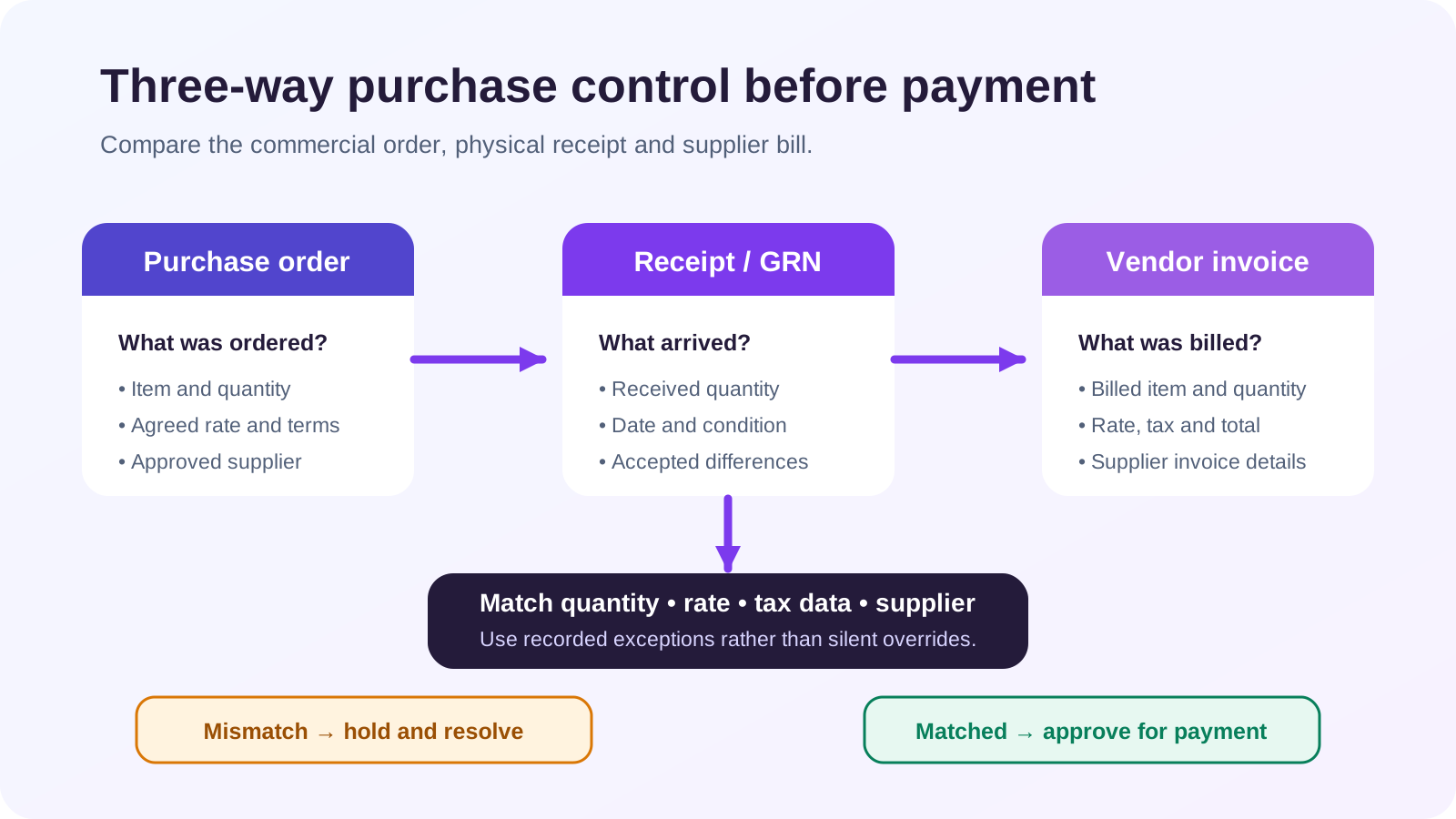
A purchase order (PO) records what the buyer authorised, a goods receipt note (GRN) records what physically arrived and was accepted, and a vendor invoice records what the supplier billed. Three-way matching compares quantity, price, tax and identity across all three before a purchase is approved for payment. A match is an internal control; it does not by itself prove GST ITC eligibility.
Current-status caution, reviewed 15 October 2026: “GRN” is a common operational name, not a substitute for the tax invoice or transport documents required for the transaction. Your contract, industry, inspection process and GST facts determine which additional records are needed.
The direct answer
Do not use one document for all three jobs. The PO is forward-looking authorisation. The GRN is receiving evidence. The vendor invoice is the supplier’s financial and tax claim. Pay only after approved differences are explained, and post the purchase from the accepted invoice and receipt evidence rather than copying the PO blindly.
The three documents side by side
| Control question | Purchase order | GRN / receipt record | Vendor invoice |
| What does it prove? | What was approved to buy | What arrived, when, where and in what condition | What the supplier asks you to pay |
| Who usually creates it? | Buyer | Receiving/store team | Supplier |
| Typical fields | Vendor, item, quantity, agreed price, tax assumptions, delivery terms | PO reference, item, accepted/rejected quantity, batch/serial, warehouse, date | Supplier GSTIN, invoice number/date, item, taxable value, tax and total |
| Does it create a payable? | Not normally by itself | Not normally by itself | Yes, after review and posting |
| Is it enough for GST ITC? | No | No | A valid tax invoice is necessary in normal cases, but all statutory ITC conditions must still be tested |
Worked example: 100 ordered, 96 accepted, 100 invoiced
A distributor orders 100 mixer units at ₹500 each, before applicable GST. The PO therefore authorises ₹50,000 of goods subject to the stated tax and delivery terms.
At the warehouse, 100 units arrive, but four are damaged. The receipt record shows 96 accepted and four rejected, with photographs and the transporter acknowledgement. The supplier invoice bills all 100 units.
The match should not be forced to “pass” because the invoice agrees with the PO. Quantity accepted is 96, while quantity billed is 100. Accounts payable places the difference on hold, tells the supplier exactly which line failed, and requests the appropriate corrected document or settlement under the agreed terms. The warehouse evidence remains linked to the PO and invoice.
Once the difference is resolved, the business posts only the supported obligation. It separately checks the supplier GSTIN, tax invoice particulars, receipt of goods, GSTR-2B and all other ITC conditions. The GRN proves receipt control; it does not grant credit on its own.
A practical three-way matching sequence
- Confirm that an authorised person approved the PO and any later amendment.
- At receipt, record the actual item, quantity, condition, warehouse, date and PO reference.
- Separate accepted, rejected, short and excess quantities instead of editing the ordered quantity.
- Compare supplier identity, GSTIN, invoice number and invoice date.
- Compare quantity billed with quantity accepted, allowing only documented tolerances.
- Compare unit price, discount, freight and other charges with the approved terms.
- Recalculate taxable value and tax; do not assume the PO’s estimated tax is final.
- Route exceptions to a named owner and block only the disputed amount where the process permits.
- Post the reviewed vendor invoice once the evidence supports it.
- Reconcile the final purchase with the supplier ledger before payment, and with GSTR-2B before claiming ITC.
Evidence checklist
- approved purchase requisition and PO;
- vendor acceptance or contract;
- PO amendment history;
- gate entry, delivery challan or transporter document;
- GRN/receipt note with accepted and rejected quantity;
- inspection, damage or shortage evidence;
- supplier tax invoice and any credit/debit note;
- GSTR-2B reconciliation result;
- approval for price or quantity tolerance; and
- payment and supplier-ledger trail.
Exceptions that need a defined policy
Services. There may be no physical GRN. Use a service-entry sheet, milestone approval, timesheet or other evidence that the contracted service was received.
Partial deliveries. One PO may have several receipts and several invoices. Match cumulatively so the second invoice does not reuse quantity already billed.
Freight and incidental charges. The PO may permit them even when they do not appear as stock quantity. Compare them to the contract and correct GST treatment separately.
Accepted tolerance. Manufacturing inputs may have contractual weight or quantity tolerances. Record the policy and approval; do not hide the difference by changing source data.
Invoice before goods. Keep the invoice pending rather than posting receipt that did not occur. Cut-off at month-end must distinguish goods in transit, goods received not invoiced and invoices received before goods.
Common mistakes
- Converting the PO amount directly into a vendor bill without checking receipt.
- Treating “delivered” as “accepted” when inspection found damage or shortage.
- Changing the GRN to match the invoice instead of documenting the exception.
- Paying the full invoice while leaving the rejected quantity in stock.
- Claiming ITC because a GRN exists, without a valid invoice and the other legal conditions.
- Matching only total value while item quantities, GSTIN or tax differ.
- Losing the link when one PO is split across several receipts and invoices.
How Truetal helps
Truetal can create, edit and share purchase-order PDFs; record the supplier invoice in the Purchase Register; and separately post a reviewed stock receipt linked to an existing purchase or vendor bill. Truetal does not currently have a dedicated GRN model, partial-receipt workflow or automated three-way match, so receipt evidence and exception approval remain explicit human-controlled steps.
FAQ
Which comes first: PO, GRN or vendor invoice?
Normally the buyer issues the PO first, receiving records the goods next, and the supplier invoice is matched to both. In practice an invoice can arrive before the goods, but it should remain pending until the receipt evidence is available.
Can I book a purchase directly from a PO?
A PO is an authorisation, not proof that goods or services were received or that the supplier’s invoice is correct. Post the payable only from reviewed source evidence under your accounting policy.
Is a GRN compulsory for GST ITC?
GST law focuses on the prescribed document, receipt of goods or services and the other statutory conditions. A GRN is useful receipt evidence, but it is not by itself a tax invoice or an automatic ITC entitlement.
What if the invoice quantity is higher than the GRN quantity?
Hold and investigate the difference. Check later receipts, approved tolerance, damage or rejection and contract terms, then obtain the appropriate supplier correction or documented approval rather than forcing the match.
The takeaway
Keep authorisation, receipt and billing separate, then connect them. Three-way matching works because no single team or document can quietly prove the entire purchase.